

Reach out to support@sosha.ai with any additional questions or submit a ticket below.
Submit ticketCreating a New Custom Domain
Replace app.sosha.ai on live toolkits to reflects your organization’s brand across all your toolkits and the links people share.
To set up a custom domain:
Once logged into your SoSha account, click Custom Domains on the left side.

Click + Add Custom Domain.

Enter the domain name you want to use — make sure it’s spelled correctly and that you have access to manage its DNS settings via your domain provider. Enter an internal name and your redirect URL. People will be brought to the redirect URL if the whitelabel is not functioning.
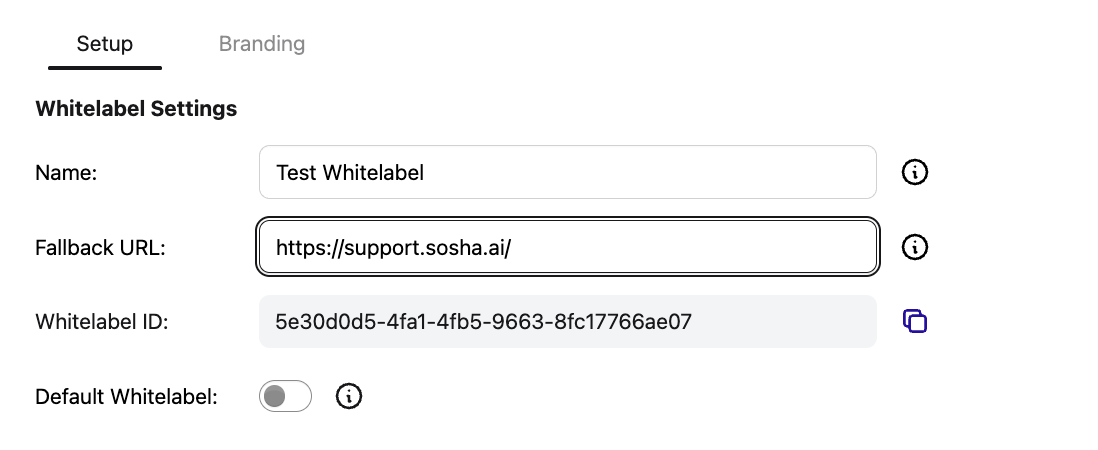
Optional: Enable default whitelabel to assign all new toolkits to this whitelabel.
Click Create. You'll now see instructions to add these records in your DNS settings at your domain provider.

Note: if you need to pass these instructions to someone to your team, click email me these records and forward this to a colleague.

Once the records are verified, allow up to 30 minutes for the SoSha platform to recognize and connect to your domain.

To assign a toolkit to your custom domain, go to the settings of the individual toolkit.

Select the custom domain under the Custom Domain section, and select one to add to this toolkit. It may take a few minutes for the custom domain to connect with the toolkit.

Note: You can assign the same custom domain to multiple toolkits.